Qtenboard ස්මාට් පණිවිඩ
What Is a Smart Board and How Does It Work? A Guide for Modern Offices
A smart board is a large touchscreen display that works as an interactive whiteboard, a presentation screen and a video-conferencing hub in one device. In a modern office it replaces the whiteboard, the projector and the tangle of meeting-room cables with a single panel that teams can write on, share content to and use to join remote calls.
Whether you run a small startup, a large corporate boardroom or a hybrid team spread across several cities, the right interactive whiteboard for office use can make meetings shorter, clearer and easier to follow up. This guide explains what a smart board is, how it works, which features matter for business meetings and hybrid teams, how Zoom and Teams integration works, and what the real cost and ROI look like.
In this guide
A smart board, also called an interactive whiteboard or interactive flat panel (IFP), combines a large touch-sensitive display with built-in computing power. Users can write, draw, annotate and interact with digital content in real time, using a finger or a pen. Unlike a traditional whiteboard, everything on the screen can be saved, shared and reopened later, and remote participants can join the same session.
In everyday use, yes. "Smart board" is the popular name, "interactive whiteboard" is the generic product category, and "interactive flat panel" describes today's version: a 4K LCD touchscreen with its own operating system, speakers and apps, rather than a projector aimed at a board. If you are comparing options for teaching rather than meetings, our smart board guide for schools and business covers the classroom side in more detail.
Qtenboard's EDLA-certified solutions bring these pieces together with interactive software, AI-driven features and dual operating system options (Android and Windows), so one device can serve a small huddle room or a full boardroom.
At its core, a smart board detects physical input, such as a finger touch or a pen stroke, using sensors built into or around the screen. The input is converted into digital commands in real time, so what you write appears on the display instantly and can be edited, saved or shared. The process runs as a continuous loop of input and output between the user, the touch layer, the computing unit and the screen.
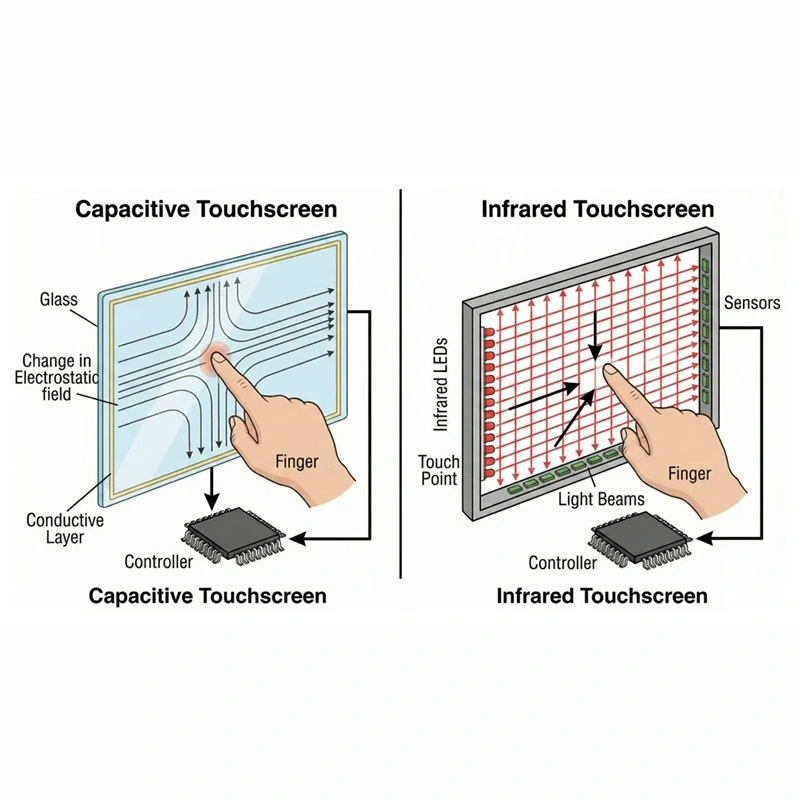
Most smart boards use one of two technologies. Infrared touch uses a grid of infrared beams across the screen surface and registers a touch when a finger or pen interrupts the beams. It is cost-effective, works with any pointing object and supports many simultaneous touch points. Capacitive touch senses the electrical charge of a finger, like a smartphone, and offers a very smooth feel. Qtenboard's meeting-room panels use infrared touch with zero-gap bonding, which removes the air gap between glass and LCD so writing feels precise and shadow-free. You can read why this construction matters in why high-end interactive whiteboards choose full lamination.
A smart board runs its own system. Android is built in and runs the whiteboard software, browser and apps. Windows can be added through an OPS PC module that slides into the back of the panel, which suits offices that rely on Windows-only software. The result is either a standalone device or a display that doubles as a full PC.
Office-grade smart boards use 4K LCD panels with wide viewing angles so everyone in the room can read small text and detailed charts. Qtenboard panels offer 3840 x 2160 resolution, up to 450 cd/m² brightness and a 178-degree viewing angle, with a typical LCD lifespan of 60,000 hours.
Wi-Fi, Bluetooth and wireless casting let laptops, tablets and phones share their screens without cables, while HDMI, USB, Type-C and network ports cover wired connections. If casting ever lags or drops, our guide to interactive whiteboard screen mirroring problems explains the hardware and Wi-Fi specs that actually fix it.
Whiteboard software handles writing, shapes, handwriting recognition, page management and export. Cloud features let teams save a session, send it as a file or QR code and reopen it later, which is what turns a meeting board into a shared record instead of something erased at the end of the day. See how this works in practice in Qtenboard Smart Whiteboard for classrooms and hybrid workspaces.
Multiple participants can write on the same smart board at once, whether they are in the room or joining remotely. This real-time collaboration speeds up brainstorming, project planning and decision-making, and keeps everyone engaged instead of watching one person present.
Digital features such as cloud storage, instant annotation and file sharing save teams time every day. A McKinsey study found that integrating digital collaboration tools can lift knowledge-worker productivity by 20–25%. With interactive whiteboard productivity tools, notes, diagrams and presentations stay accessible after the meeting, which reduces rework and "what did we decide?" follow-ups.
Qtenboard smart boards work with popular platforms such as Zoom, Microsoft Teams and Google Meet, so employees can join calls, present and collaborate without switching between devices. The next sections cover this in detail.
One panel can replace a projector, a whiteboard, a conference camera and a presentation PC. Fewer devices means fewer cables, fewer remotes and fewer things to troubleshoot before a meeting starts. For a side-by-side look at the trade-offs, read interactive whiteboard vs projector: the 2026 business comparison.
A smart board for business meetings turns the room's main screen into a working surface. Instead of presenting slides and taking notes separately, teams can annotate on top of any document, capture decisions on the spot and send the result to everyone before they leave the room.
Qtenboard offers a complete interactive whiteboard meeting solution for developers, integrators and distributors, with customisable hardware, remote support and factory-direct pricing.
Hybrid work only works when remote colleagues can see, hear and contribute as easily as people in the room. A smart board for hybrid meetings solves the usual problems: remote participants cannot see the whiteboard, cannot hear the quiet end of the table, or are ignored because the camera is pointed at a presenter.
අපේ තැන 86-inch smart AI whiteboard for hybrid meetings combines real-time transcription, meeting summaries, wireless casting and video conferencing in a single 4K panel with up to 50-point touch.
Qtenboard smart boards support Zoom, Microsoft Teams and Google Meet, so meetings run on the platform your company already uses. How the integration works depends on how the board is configured:
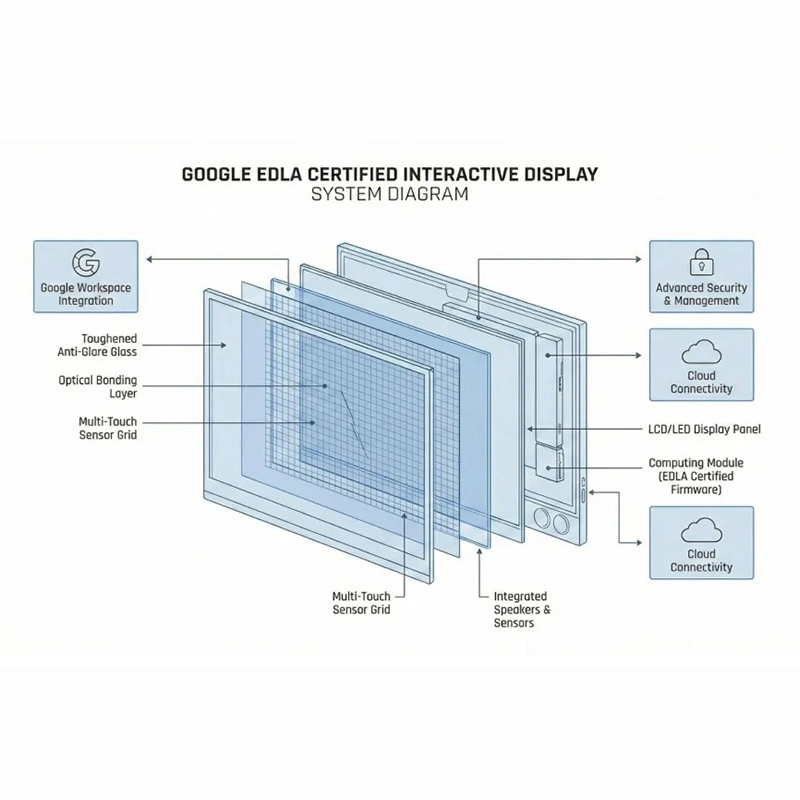
On an EDLA-certified Android board, you install the meeting app directly from Google Play and join calls on the panel itself, with no extra computer. EDLA (Google's Enterprise Device Licensing Agreement) certification is what allows the board to run Google Mobile Services natively. The Google EDLA certified interactive flat panel is built for this approach.
Adding an OPS PC module (Windows i5 to i7) lets the board run the full desktop versions of Teams, Zoom or other Windows software. This is the right choice when your meetings rely on desktop-only plug-ins or corporate software. Browse the OPS PC module to see what is available.
With a bring-your-own-meeting (BYOM) setup, the room's laptop or mini-PC connects to the board's camera, array microphone and speaker over a single cable. Any meeting platform on that laptop then uses the board's conference hardware. Qtenboard's BYOM video conferencing interactive whiteboard is ready for Zoom, Teams and Google Meet and suits companies that standardise on one platform.
For a short, practical comparison of the three platform approaches, read EDLA vs AOSP vs Windows dual-OS. Confirm the exact configuration for your platform when you request a quote.
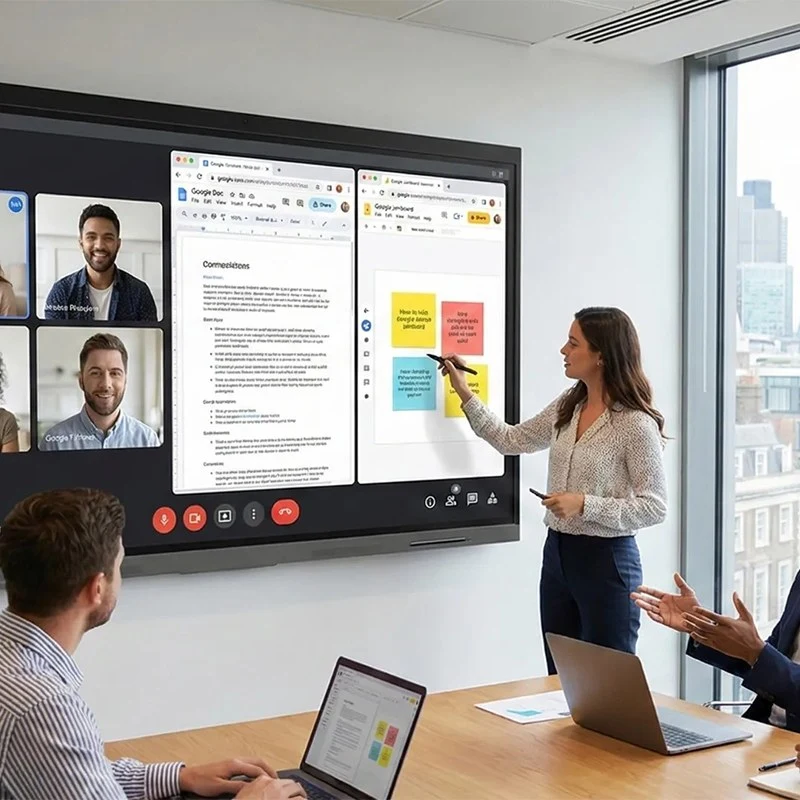
Qtenboard's AI-enhanced interactive whiteboards add tools that remove repetitive meeting work:
For a buyer-focused look at what to evaluate, read AI meeting whiteboards: transcription, minutes and smart collaboration, or view the meeting smart whiteboard with speech-to-text and AI camera.
Use this smart board features comparison to decide which options matter most for your office.
| විශේෂය | Options | හොදම වෙන්න |
|---|---|---|
| තාක්ෂණය | Infrared touch (cost-effective, many touch points) or capacitive touch (smartphone-like feel) | Infrared for most meeting rooms and budgets; capacitive where a phone-like feel matters most |
| Operating system | Android, Windows (OPS module) or dual OS | Android for simplicity; Windows for desktop software; dual OS for flexibility |
| Google certification | EDLA-certified or uncertified Android | EDLA for Google Play, Workspace and secure device management |
| දෘෂ්ටිකෝණය | Built-in camera and mic, BYOM kit or external camera | Built-in for plug-and-play rooms; BYOM for one standard platform |
| දර්ශනය | 4K, 350–450 cd/m² brightness, 178-degree viewing angle | Rooms with windows, detailed charts and large tables |
| දුරකත | Wall mount or mobile stand | Fixed rooms vs shared spaces that move between teams |
| කළමනාකරණය | DMS දුරස්ථ කළමනාකරණය | Companies with many rooms or multiple sites |
Decide whether the board will mainly be used for presentations, collaborative design, team brainstorming or hybrid calls. The main use case determines how much you need to invest in cameras, audio and software.
Match the size to the room and the number of people. The table below follows Qtenboard's sizing chart; viewing distance matters as much as headcount, so choose the larger size if people sit far from the screen.
| Room type | Typical size | People | Qtenboard option |
|---|---|---|---|
| Huddle and focus rooms | අඟල 55 ක් | Up to 10 | Huddle room interactive flat panel |
| කුඩා රැස්වීම් කාමර | අඟල 55 | 10–20 | 65-inch 4K interactive flat panel |
| Medium meeting rooms | 75 inch | 20–30 | Business interactive whiteboards |
| Conference rooms and boardrooms | 86 inch | 30–40 | 86-inch interactive flat panel for meeting rooms |
| Large boardrooms and training rooms | 98–110 inch | 40+ | 110-inch interactive flat panel |
Make sure the board works with your office ecosystem, including Windows, macOS, Zoom, Microsoft Teams and Google Workspace.
Wall-mounted boards suit dedicated rooms. If one board has to serve several spaces, a mobile display stand lets you move it between rooms.
Qtenboard offers Android, Windows (via OPS) and dual-OS options so your team can run the software it already uses.
For a complete checklist covering touch technology, operating system, video-conferencing support, security, warranty and total cost, see How to Choose an Interactive Whiteboard in 2026: B2B Buyer's Guide.
Smart board prices vary with screen size, touch technology, camera and audio hardware, and operating system. Do not forget the costs around the panel: software subscriptions, pens, mounts or stands, an OPS module if you need Windows, installation and extended warranties. For current price ranges, see 2026 interactive whiteboard cost ඒ වගේම 86-inch interactive flat panel price.
Forrester research on collaboration and unified communication tools reports returns of up to 137% within three years, driven by shorter meeting preparation, lower travel costs and fewer collaboration inefficiencies. Results depend on how often the board is used, so treat this as a benchmark and calculate your own figures.
As an illustration only: if a smart board saves 10 minutes of setup and note-writing in each of 6 weekly meetings, that is about 52 hours a year in a single room, before counting travel and equipment savings. Buying direct from the factory also helps; see why buying interactive smart boards in bulk directly from Qtenboard saves more.
With proper care and regular software updates, Qtenboard interactive whiteboards typically last 5–7 years depending on usage, and the LCD panel is rated for about 60,000 hours.
Affordable, compact units with built-in interactive apps for limited space. A 55–65 inch panel on a mobile stand can serve several rooms.
Multi-user, multi-room deployments with advanced security, DMS system support and AI-powered meeting tools for consistent experience across sites.
Optimised for video conferencing, screen sharing and remote participation, with cameras and array microphones built in or added through a BYOM kit.
Precision touch and pen input for visual collaboration, supported by rich design and annotation software.
See how businesses and schools use Qtenboard displays in our successful cases.
A meeting-room screen holds sensitive material, from financial figures to product plans, so security is part of the buying decision. EDLA-certified Qtenboard smart boards include secure locks, a DMS (device management system) and IT management tools to protect corporate data.
Learn more about the cloud side in Qtenboard Cloud Ecosystem for interactive whiteboard management.
Qtenboard has manufactured interactive whiteboards since 2015 from a 330,000 sqm production base, with all models EDLA-certified. Popular options for offices include:
Browse every model in the interactive whiteboard for business range, or see the interactive whiteboards for school range if you also need classroom units.
A smart board is a large touchscreen display with built-in computing power that works as an interactive whiteboard, presentation screen and video-conferencing hub. Users write on it with a finger or pen, and content can be saved and shared.
In everyday use, yes. Smart board is the popular name for an interactive whiteboard. Today's version is usually an interactive flat panel: a 4K touchscreen with its own operating system, speakers and apps.
Sensors, such as an infrared grid, detect finger or pen touches. A built-in computing unit turns them into digital commands, and the screen shows the result instantly. Connected devices and cloud tools let you share and save the content.
Yes. All major platforms are supported for hybrid collaboration, either through the built-in Android system, a Windows OPS module or a BYOM plug-and-play conferencing setup.
Some functions, such as note-taking and drawing, work without internet. Cloud sharing, AI features and remote collaboration need a network connection.
Use 55 inch for huddle rooms, 65 inch for small meeting rooms, 75 inch for medium rooms, 86 inch for conference rooms and 98 to 110 inch for large boardrooms. Choose the larger size when people sit far from the screen.
For most offices, yes: a smart board offers brighter images in lit rooms, built-in touch and no lamp replacement. The interactive whiteboard vs projector comparison covers cost over seven years.
නියම සැලකිලිමත් සහ මෘදුකාංග යාවත්කාලීන සමඟ, Qtenboard සාමාන් යයෙන් පසුව අවුරුදු 5-7 වසරයි.
EDLA is Google's Enterprise Device Licensing Agreement. An EDLA-certified board can run Google Play and Google Workspace natively and supports secure device management, which matters for business deployments.
In the era of digital transformation, smart boards and interactive whiteboards are changing how offices meet and collaborate. With AI features, dual OS options, infrared and capacitive touch choices, EDLA certification and secure DMS management, Qtenboard devices help teams collaborate smarter, work faster and adapt to hybrid workflows.
Investing in a Qtenboard smart board is more than a technology upgrade. It is an investment in a more connected, interactive and productive workplace.
Discover how Qtenboard smart boards can lift productivity and connectivity in your workplace.
Explore Qtenboard interactive whiteboards for business meetings, with full specs and models.
Read Product
 SIN
 EN
 MAY
 TH
 CHT
 BUR
 VIE
 ID
 FIL
 LAO
 HKM