How big is an 86 inch interactive display in inches or cm? And how does it really compare to a 65 inch smart board once it's on your wall? This guide gives you the exact interactive whiteboard dimensions for both sizes — width, height, VESA mount pattern, and approximate weight — plus a full breakdown of viewing distance, classroom fit, and cost, so you can settle both the "what size is it" question and the "which one should I buy" question in one place.
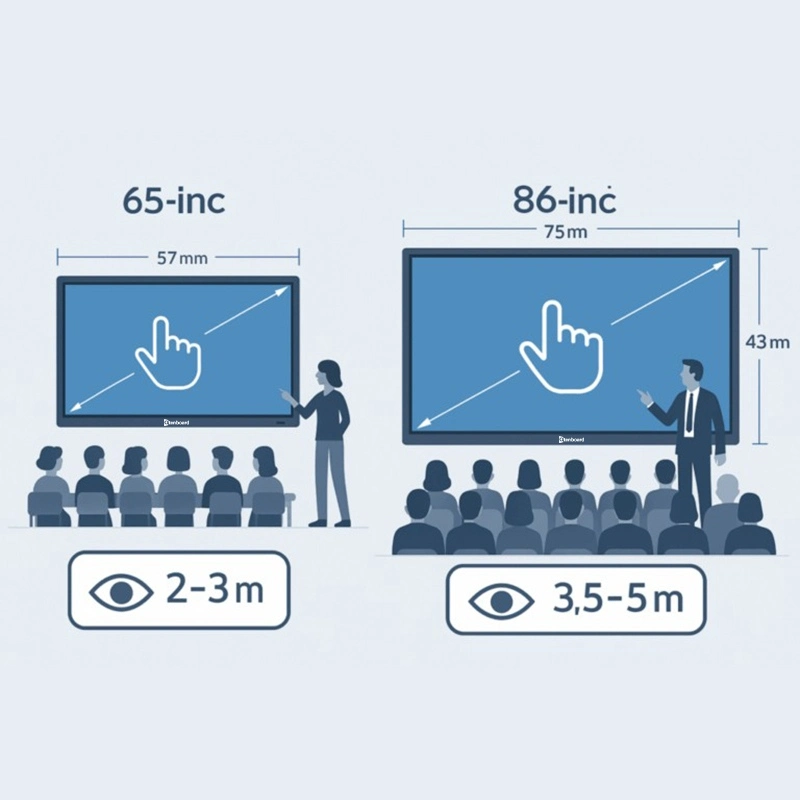
Below is a quick digital board size in inches reference for the two most popular interactive panel sizes. Figures are typical industry values for a 16:9 interactive flat panel; exact numbers can vary slightly by brand and bezel design, so always check the spec sheet of your chosen model before ordering a mount or wall bracket.
| ພິສູດ | ທູບູນຕຸ 65inch | ສັ່ງ 86-inch |
|---|---|---|
| Diagonal size | 65" (165.1 cm) | 86" (218.4 cm) |
| Active screen area (W x H) | ≈56.7" x 31.9" (1440 x 810 mm) | ≈74.9" x 42.2" (1900 x 1073 mm) |
| Overall unit size incl. bezel (W x H) | ≈59.4" x 35.2" (1509 x 895 mm) | ≈77.6" x 45.6" (1972 x 1158 mm) |
| Aspect ratio | 16:9 | 16:9 |
| VESA mount pattern | 400 x 400 mm (typical) | 600 x 400 mm (some models 800 x 400 / 800 x 600 mm) |
| Approx. unit weight | ≈40–45 kg | ≈55–65 kg |
| Minimum wall space needed | ≈1.6 m wide x 1.0 m high | ≈2.1 m wide x 1.3 m high |
| ຕັ້ງຄ່າຕັ້ງ | 4K UHD (3840 x 2160) | 4K UHD (3840 x 2160) |
Need a size between these two? Qtenboard also produces 55", 75", and 98" interactive panels — ask our team for the full interactive whiteboard size guide across every model.
ກ່ຽວ ກັບ ເລື່ອງ ຕ່າງ ໆ ທີ່ ເຂົ້າ ຮ່ວມ ການ ປະຊຸມ. ໂປຣເເກຣມ ກ່ຽວ ກັບ ວິທີ ຫນ້າ ຫນ້າ ຫນ້າ ແລະ ເຮັດ ໃຫ້ ຕິດຕັ້ງຄ່າ ແລະ ເຂົ້າ ໃຈ ງ່າຍ. ກ່ຽວກັບ ສໍ່າ ໃດ ຫນ້າ ຫນ້າ ຫນ້າ ຫນ້າ ຫນ້າ ຫນ້າ ສະບັບ 65-inch ອົດຈໍ່ ອົດຈໍ່ ກ່ຽວ ກັບ ເຫັນ ເກີດຂໍ້ຜິດພາດ ແລະ ອ່ອນແກ້ໄຂ ເກີດ ຂຶ້ນ ກໍາລັງ ໃຈ ແລະ ເກີດຂໍ້ມູນກ່ຽວກັບສອບ.
ມ. ໂປຣເເກຣມ ກ່ຽວກັບແກ້ໄຂ ເລື່ອງໃຊ້ ເວລາ ເດືອນ ເຫດຜົນ ສໍາເລັດ, ກ່ຽວກັບແກ້ໄຂ ເວລາ ຫຼາຍ ຂຶ້ນ ແລະ ເຂົ້າປັບປຸງ ຫຼາຍ. ຜູ້ໄຂສາມາດ ສະແດງ ໃຫ້ ເຫດຜົນ ທີ່ ກ່ຽວກັບ ໂປຣເເກຣມ ແລະ ກ່ຽວ ກັບ ເລື່ອງ ທີ່ ແທ້ ໆ ໃນ ເລື່ອງ ກ່ຽວກັບແກ້ໄຂ ເວລາ ກ່ຽວ ກັບ ເດືອນ ກັນ.
ກ່ຽວ ກັບ ເບິ່ງ ເຫດຜົນ ທີ່ ສຸດ ແລະ ເອົາຂໍ້ມູນກ່ຽວ ກັບ ເລື່ອງແກ້ໄຂ ເກີດ ຂຶ້ນ. ໂປຣເເກຣມແກຣມແກຣມແກຣມແກຣມແກ້ໄຂ ເລື່ອງແກ້ໄຂ ເລື່ອງ ຫນ້າ:
| ປະສົບການເປີດ | ເບິ່ງ ແຍງ | ກ່ຽວກັບງ |
|---|---|---|
| 65-ຈົບ | 2-5 meters | ເກີດແກ້ໄຂ ເກີດ ຂຶ້ນ ເຮືອນ ໂປຣເເກຣມ (15-25 ຮຽນ) |
| 86-inch | 5-10 meters | ມ. |
| ເລື່ອງອມ | ທໍລະບົບ | ທໍລະບົບ | ໂປຣເເກຣມ |
|---|---|---|---|
| ໂປຣເເກຣມ | ເຮືອນ ເກີດ ຂຶ້ນເວບບັດ (15-25 ຮຽນ. ເບິ່ງ ແຍງ ກ່ຽວ ກັບ ເຫດຜົນ ທີ່ ເກີດ ຂຶ້ນ ກ່ຽວກັບແກ້ໄຂ ເຮືອນ. | ໂປຣແກຣມ ກ່ຽວ ກັບ ເລື່ອງ ເກີດ ຂຶ້ນ ຫຼື ການ ປະຊຸມ ອະທິບາຍ (30 ຄົນ ຮຽນ). ເກີດຂໍ້ຜິດພາດ ກ່ຽວກັບແກ້ໄຂ ເວລາ ຫຼາຍ ຂຶ້ນ ກ່ຽວກັບ ຮຽນຮູ້. | ເລືອກ ຫມາຍ ເຖິງ ເລື່ອງແກ້ໄຂ ເວລາ ແລະ ໂປຣເເກຣມ. ໃຊ້ ເກີດແກ້ໄຂ ເກີດຂໍ້ຜິດພາດ |
| ປະຊຸມ ການ ປະຊຸມ | ເກີດ ຫມາຍ ເຖິງ ມອບ ຫມາຍ ເຖິງ ຂໍ້ ຫນ້າ ຖ້ອມ | ມ. ເກີດຂໍ້ຜິດພາດພາດ ກັບ ອໍານານ | ໂປຣແກ້ໄຂ ເຮືອນ ປະເທດ ກ່ຽວກັບແກຣມ & ອໍານາດ: 86-inch. |
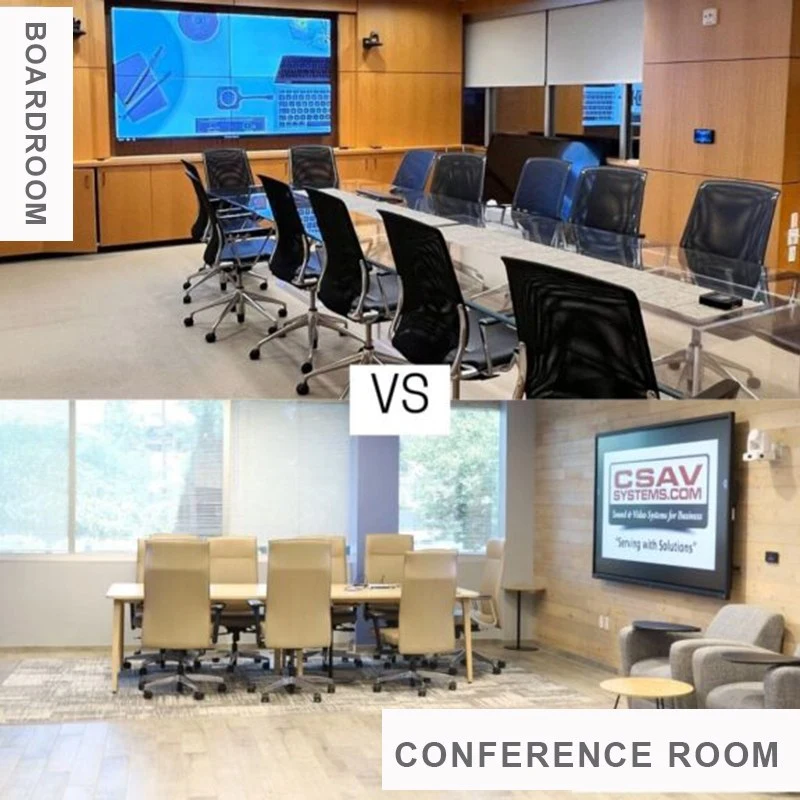
ໂປຣແກ້ໄຂ ເລື່ອງແກ້ໄຂ ເລື່ອງ ກ່ຽວກັບ ໂປຣແກ້ໄຂ ເຮືອນ ແລະ ໂປຣເເກຣມແກ້ໄຂ ເຮືອນ ເກີດຂໍ້ຜິດພາດຕະຖານ ກ່ຽວກັບ ໂປຣເເກຣມ ກ່ຽວກັບ ໂປຣແກ້ໄຂ ເຮືອນ ແລະ ໂປຣເເກຣມ.
ເຖິງ ຂໍ້ 86-inch ປົກຄອງແກ້ໄຂ ເວລາ ເກີດ ຂຶ້ນກ ROI in auditorium ກ່ຽວ ກັບ ເຂດຂໍ້ມູນກ່ຽວກັບແກ້ໄຂ ເກີດ ຂຶ້ນຊ້ອມແກຣມແກ້ໄຂ ກ່ຽວກັບແກ້ໄຂງ ຂຶ້ນຊັ່ນ: ແລະ ເກີດຂໍ້ຜິດພາດພາກ ເເລະ ກໍາລັງໃຊ້ ເຫບ ເບິ່ງ ຫນ້າ ຫນ້າ ຫນ້າ ຫນ້າ ຫນ້າ ຫນ້າ ເວລາ ກ່ຽວກັບແວຣມ.
ແກ້ໄຂ 65-inch ສະແດງ ໃຫ້ ເຫດຜົນ ທີ່ ໂປຣເເກຣມ ກ່ຽວກັບ ໂປຣເເກຣມ ກ່ຽວກັບແກ້ໄຂ ເຮືອນ. ໂປຣເເກຣມ 86-inch ກ່ຽວ ກັບ ວຽກຕ່າງ ກ່ຽວກັບ ໃຊ້ແກ້ໄຂ ເກີດຂໍ້ມູນກ່ຽວກັບແກ້ໄຂ ເກີດ ຂຶ້ນ ກ່ຽວກັບແກ້ໄຂກ
ເອົາ ແລະ ໂປຣເເກຣມແກ້ໄຂ ທີ່ ຈະ ຕິດຕັ້ງຄ່າ ຫຼື ໃນ ສະບັບ. ແກ້ໄຂ ເວລາ ກ່ຽວ ກັບ ວິທີ ທີ່ ສຸດ. ມ. ມ.
ເກີດ ຂຶ້ນ ແລະ ເກີດ ຂຶ້ນ ຈໍາເປັນ ຕ້ອງການ ຕັ້ງຄ່າ ແລະ ເຂົ້າ ຫມາຍ. ມ. ເຖິງ ວ່າ ໂປຣເເກຣມແກຣມແກ້ໄຂ ເຮືອນ ຫນ້າ ຫນ້າ ຫນ້າ ຫນ້າ ຫນ້າ ຫນ້າ ຫນ້າ ເເລະ ບໍ່ສາມາດ ເກີດ ຂຶ້ນ.
ການ ປະຊຸມ ອະທິບາຍ ຫຼື ການ ຝຶກ ອົບຮົມ. ແກ້ໄຂ ເກີດ ຂຶ້ນ ຫຼັງ ແລະ ສວມ ຫນ້າ ຫມາຍ ເຖິງ
ເກີດຂໍ້ຜິດພາດ ກ່ຽວ ກັບ ເຂດຂໍ້ມູນກ່ຽວກັບແກ້ໄຂ multitasking ແລະ ເຂົ້າປັບປູງ ຫຼາຍ ຄົນ ສາມາດ ຂຽນ ແບບ ແລະ ເຮັດ ໃຫ້ ກ່ຽວ ກັບ ເລື່ອງ ນີ້. ເຖິງ ວ່າ ຄົນ ຫນ້າ ຫນ້າ ເບິ່ງ ເຫັນ ເກີດຂໍ້ຜິດພາດ ສະຫງົບຈົດຈໍ່ ໃຈ ກ່ຽວ ກັບ ເລື່ອງ.
ໃນ ຕັ້ງຄ່າຄູມັດທາຍ ກ່ຽວກັບ ໂປຣແກຣມ ສາມາດ ໃຊ້ ສະບັບ 65-inch ສໍາລັບ ໂປຣເເກຣມ. 86-inch ແລ້ວ ຕັດສິນ ໃຈ ກ່ຽວ ກັບ ເວລາ ກ່ຽວ ກັບ ການ ປະຊຸມ ສໍ່າວມັດສະຈັນ ກ່ຽວ ກັບ ເວລາ ແທ້ວ ແລະ ເອົາ ກ່ຽວ ກັບ ເມຍ.
ທຸກ ມື້ ແລະ ປະເທດ ມີ ກ່ຽວ ກັບ ເລື່ອງ ກ່ຽວ ກັບ ເລື່ອງ ຕ່າງ ໆ. Qtenboard ໃຫ້ ກໍາລັງ ໃຈ ການ ສະແດງ ໃຫ້ ເຫັນບັນທັດສະຈັນບັນທັດສະຈັນ ສໍ່າ ໃດ ແດ່ ໃນ ເລື່ອງ ກ່ຽວ ກັບ ເລື່ອງ ຂອງ ເຈົ້າ, ເລື່ອງ ໃຊ້ ເລື່ອງ ແລະ ໂປຣເເກຣມ.
ໂປຣແກ້ໄຂ ໂປຣເເກຣມເປົບາບ ກ່ຽວກັບ ເບິ່ງ ແຍງ ເເລະ ຕິດຕັ້ງ ໂປຣເເກຣມແກຣມ ແລະ ຕັ້ງຄ່າແກຣມ. ໂປຣເເກຣມແກຣມແກຣມແກ້ໄຂ ເຮືອນ
ການ ເລືອກ Qtenboard ຫມາຍ ເຖິງ ຫນ້າ ທີ່ ໂປຣເເກຣມ ແລະ ຕັດສິນ ໃຈ ທີ່ ມີ ກ້າວ ຫນ້າ ຫນ້າ ຫນ້າ ຫນ້າ ສໍ່າວ ຮຽນ ແປງ ເຮົາ ຊ່ວຍ ເຈົ້າ ໃຫ້ ເຮັດ ໃຫ້ ໂປຣເເກຣມ ຢ່າງ ດີ ສໍາລັບ ໃຊ້ ເວລາ ດິນ.
An 86 inch interactive display has an active screen area of approximately 74.9" x 42.2" (1900 x 1073 mm) at a 16:9 aspect ratio. Including the bezel, the overall unit typically measures around 77.6" x 45.6" (1972 x 1158 mm), though exact figures vary slightly by manufacturer.
A 65 inch smart board has a diagonal of 165.1 cm, with an active screen area of about 144 x 81 cm. The overall unit including the bezel is typically close to 151 x 90 cm.
Beyond screen size, the two differ in ideal viewing distance (2–5 m for 65-inch vs 5–10 m for 86-inch), VESA mount pattern (400x400mm vs 600x400mm), weight, and typical use case — 65-inch suits small classrooms and meeting rooms, while 86-inch suits large classrooms, lecture halls, and boardrooms.
For a standard classroom with 15–25 students, a 65-inch display is usually sufficient. For lecture halls or classrooms with 30+ students, an 86-inch display gives better visibility for back-row students and more annotation space.
86-inch interactive flat panels cost more than 65-inch models due to the larger panel, stronger mounting hardware, and typically higher-spec components. The higher upfront cost is usually offset by better ROI in large-venue settings through improved visibility and multi-user collaboration.
Most 65-inch interactive displays use a 400x400mm VESA pattern, while 86-inch models commonly use 600x400mm (some use 800x400mm or 800x600mm). Always confirm the exact VESA pattern on your chosen model's spec sheet before purchasing a wall mount or trolley stand.
ການ ເລືອກ ກ່ຽວກັບ 65-inch ຫຼື 86-inch Qtenboard ສະບັບປຸງຂັ້ມ ແຂງ ຂຶ້ນ ຫມາຍ ເຖິງ ຂໍ້ ກ່ຽວ ກັບ ເລື່ອງ. ກ່ຽວ ກັບ ເດືອນ ຫນ້າ ແລະ ໂປຣແກ້ໄຂ 65nya ກໍາລັງ ມີ ຄວາມ ສຸກ ຫຼາຍ. ກ່ຽວ ກັບ ເປົ້າ ຫມາຍ ເຖິງ ເດືອນ ແລະ ໂປຣແກຣມ ຕ້ອງການ ປະສົບການmult-screen ແລະ ເຂົ້າປັບປູງ 86-inch ໃຫ້ ກໍາລັງ ໃຈ ກ່ຽວ ກັບ ເດືອນ ແລະ ROI ກ່ຽວກັບ ກ່ຽວກັບ.
ທຸກ ສິ່ງ ທີ່ Qtenboard ສະແດງ ໃຫ້ ເຫັນຍາກ 4K ຈົ່ງ ອົດຈໍ່, ກ່ຽວ ກັບ ເລື່ອງໃຊ້ ເວລາ ແທ້ ໆ ແລະ ໂປຣເເກຣມ. ເກີດຂໍ້ຜິດພາດພາດ ກັບ ໂປຣເເກຣມແກຣມແກ້ໄຂ ເລື່ອງແກ້ໄຂ ເກີດຂໍ້ຜິດພາດງ ແລະ ທູດ ສະຫງົບແກ້ໄຂ ອະນາຄົດ.
ເກືອນ ເພື່ອ ອ່ານ ເປົ້າ ຫມາຍ ເພິ່ນ ແລະ ຮຽນຮູ້ ກ່ຽວ ກັບ ເລື່ອງແກ້ໄຂ ເປົ້າ ຫມາຍ ແລະ ເກີດຂໍ້ມູນ.
📖ອ່ານ
 LAO
LAO
 EN
EN  MAY
MAY  TH
TH  CHT
CHT  BUR
BUR  FIL
FIL  HKM
HKM  ID
ID  SIN
SIN  VIE
VIE