Are 65-inch smart boards for classroom use effective in large lecture halls? The honest answer depends on the room. A 65-inch all-in-one smart board is an excellent fit for standard classrooms, seminar rooms and small lecture rooms. In a university hall with 150 or more seats, a single 65-inch panel is usually too small, and you should size up to 86, 98 or 110 inches, or add repeater screens.
This guide shows where a 65-inch interactive smart board works well, where it does not, and how to choose the right size. It uses Qtenboard's published specifications for the 65 inch smart board, the 65-inch smart board for smart classrooms and its size guidance, so you can match the display to your room instead of guessing. Schools and universities in Singapore, Thailand, Vietnam, Indonesia and across Southeast Asia can use the same approach.
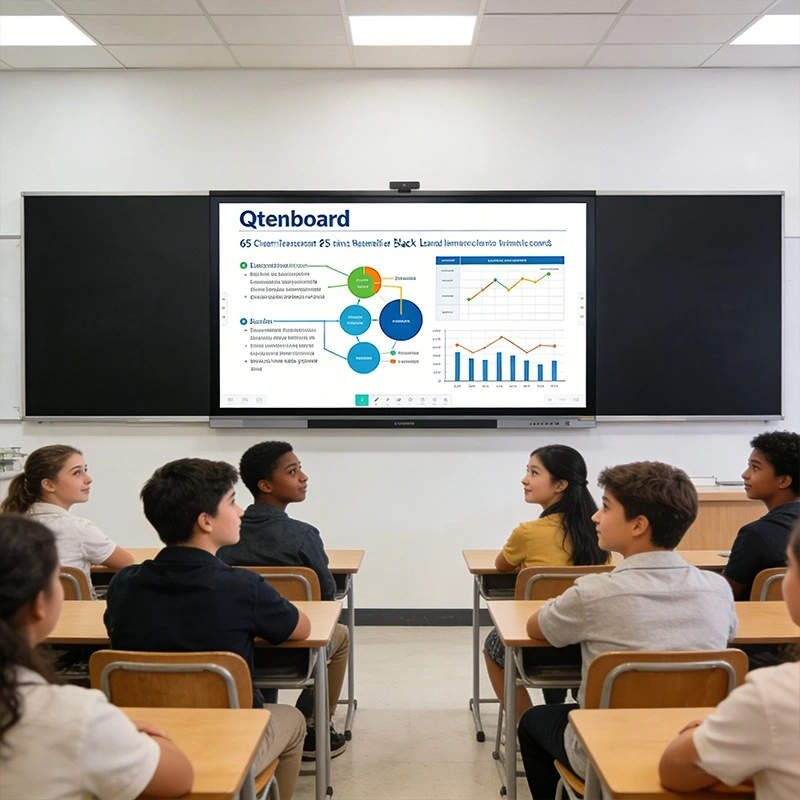
Screen size should follow the number of viewers and how far the back row sits from the board. Qtenboard's education solution guide recommends the following sizes for its interactive flat panels.
| Room Type | Inirekomendang Lakid | Typical Occupancy and Area | Mga Talaan |
|---|---|---|---|
| Small group rooms | 55 pulgadan | Up to 10 people, 8-10 m2 | Lightweight, space-saving |
| Mga karaniwang silid-aralana | 65 pulgadan | 10-20 people, 10-20 m2 | Balanced visibility, about 3 m viewing distance |
| Labs and workshops | 75 inch | 20-30 people, 20-30 m2 | Mobile stand ready |
| Mga bulwagan ng lekte | 86 inch | 30-40 people, 30-40 m2 | Clear visuals up to about 5 m |
| Large lecture rooms | 98 inch | 40-50 people, 50-70 m2 | Dual-box mobile stand available |
| Mga awditoryo | 110 inch | 50+ people, 70-90 m2 | Immersive 7-10 m viewing |
In other words, the 65 inch smart board is the right digital teaching board for rooms up to roughly 20 people. For a hall with 150 to 200 seats, plan on the largest panel available plus repeater displays, or ask our team for a seating layout review. For a detailed viewing-distance chart in meters, read Standard Interactive Whiteboard Sizes for Classrooms.
Traditional whiteboards and projectors struggle in large teaching spaces for three reasons:
A well-chosen all-in-one smart board helps with the second and third problems in any room, because it adds touch interaction, annotation, wireless sharing and AI tools. The first problem, visibility, is a size and brightness question, which is why matching the panel to the room matters.
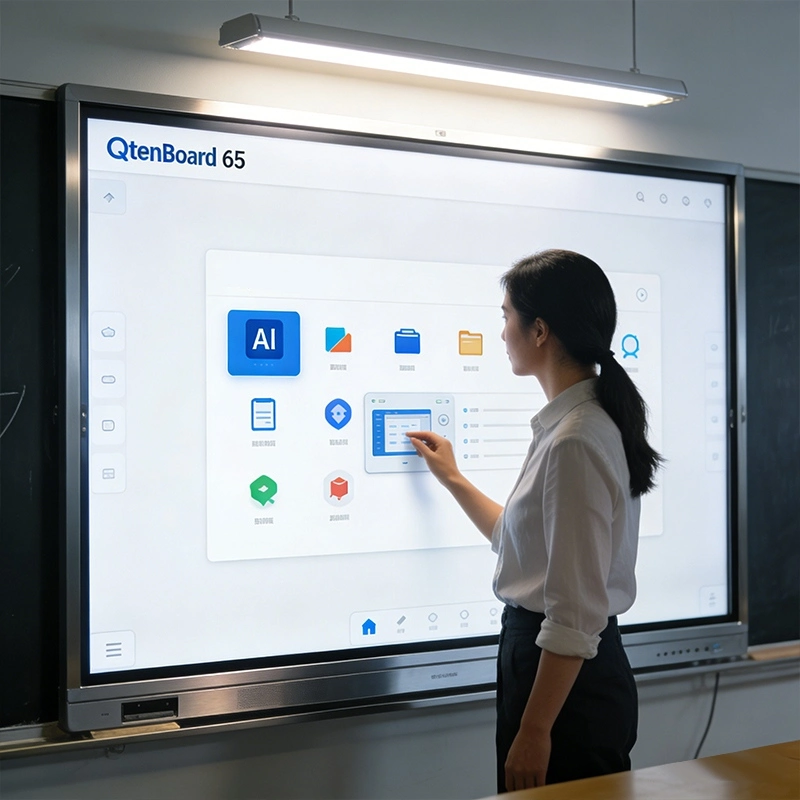
The panel delivers 3840 x 2160 4K resolution with brightness options of 350, 400 or 450 cd/m2 depending on the model, a 4000:1 typical contrast ratio and a 178-degree viewing angle. Unlike a projector, a bright LCD stays readable with the room lights on, so teachers do not need to dim the room. For a deeper look at screen construction, read Bakit Pinipili ng Mataas na End Interactive Whiteboard ang Buong Laminasyon, and see our Anti-glare interactive whiteboard for bright rooms.
Aninteractive touch board only helps if writing feels natural. This model uses infrared touch with zero-gap bonding and a 1 mm touch height, supports 20 to 50 touch points, and includes palm and wrist rejection so resting a hand does not create stray marks. Several students can work on the screen at once, which suits tutorials, labs and seminar groups.
Built-in AI features include real-time speech-to-text, automated meeting and lesson minutes that export to PDF or Word, an AI Q&A assistant, and a smart assistant for summaries, translation and voice control. These tools cut note-taking time and help multilingual classes. See more in AI Interactive Whiteboard: Ang Susunod na Kabanata ng Matalinong Pagtuturo.
The board runs Android and can add Windows through an OPS module, so lecturers can use both education apps and Windows-only software. Learn about the modular option in interactive whiteboard with OPS slot and the OPS PC module. Memory choices range from 4GB+32GB to 16GB+256GB, with dual-band Wi-Fi and Bluetooth 5.2.
Display, computing, speakers (20W x 2), camera and ports (HDMI in/out, USB, Type-C, DP, VGA, RJ45) are in one unit. Teachers cast from laptops, tablets and phones without cables. If wireless sharing ever lags, our article Interactive Whiteboard Screen Mirroring: 3 Reasons It Lags, Drops and Fails explains the specs that matter.
Child lock is built in, and a DMS remote management system lets administrators monitor devices, control apps, distribute content and shut down or reboot boards remotely. Read Enhancing Classroom Safety: Eye Protection and Data Security for Interactive Whiteboards At Qtenboard Cloud Ecosystem para sa Interactive Whitebod for details.
Even if it is not the right choice for the biggest hall, a 65-inch panel is very effective across a university campus:
Groups of 10 to 20 students can see the screen clearly and touch it directly, making discussion and problem-solving easy.
Screen recording, multi-touch demos and a durable surface make the board useful at lab benches. See the interactive flat panel for vocational STEM labs.
With camera, microphone options and Google Meet, Zoom or Microsoft Teams, one board serves students in the room and at home. The hybrid classroom interactive flat panel is configured for this use.
A rolling stand lets one board move between rooms. Explore the mobile interactive flat panel with stand At mobile display stand accessories.
When the room grows, step up the size rather than forcing a 65-inch panel to do the job. Qtenboard offers the same platform in 55, 65, 75, 86, 98, 105 and 110 inches:
For the standard 65-inch classroom, you can also view the 65-inch 4K interactive flat panel and the 65-inch IR touch interactive whiteboard for classrooms.
| Mga Tampokan | Qtenboard 65-Inch Smart Board | Tradisyonal na Whiteboardd | Projector |
|---|---|---|---|
| Display quality | 4K, 350-450 cd/m2, 178 degree viewing angle | No digital display; hard to read from far away | Image weakens in bright rooms; brightness depends on lamp |
| Interactivity | 20-50 point multi-touch, annotation, AI tools | Manual writing only | Needs a separate interactive module |
| Teaching efficiency | Save, share and export lessons; apps and wireless casting | Writing and erasing by hand | Setup and bulb or filter upkeep |
| Best room size | Up to about 20 people (larger sizes for bigger rooms) | Small rooms | Large rooms with controlled lighting |
| Extras | Speech-to-text, translation, hybrid meetings, remote management | Walan | Basic display only |
For a cost and brightness comparison over seven years, read Interactive Whiteboard vs Projector: The 2026 Business Comparison.
Large rooms often need audio and capture, not only a bigger display. Qtenboard's digital classroom AV solution adds mobile or electric lift stands, OPS PC modules, wireless screen-sharing transmitters, PTZ cameras, ceiling array microphones, classroom speakers, lecture capture recorders, a central control system and a video matrix switcher. Schools can begin with the board and add components as budgets allow. Read Qtenboard Smart Education: Pagbuo ng isang All-in-One Smart Classroom Ecosystem to see how they connect.
A smart board is an interactive whiteboard: a touch display used to write, annotate and control content. A smart board interactive flat panel is today's version, an LCD touchscreen with its own operating system, speakers and apps. Searches for interactive display board, interactive boards for schools, interactive boards for education, Interactive flat panel displays At interactive electronic whiteboard all describe this same device category.
Read What Is a Smart Board? 2026 Guide to Interactive Whiteboards for Schools and Business and the Complete Guide to Interactive Whiteboards for Classrooms and Offices for a plain explanation. If you need Google Play and Workspace support, compare platforms in EDLA vs AOSP vs Windows Dual-OS and the Google EDLA certified interactive whiteboard overview.
| Ita | Pagtukoy |
|---|---|
| Laki ng scren | 65 inch (model QM-65HY; range 55-110 inch) |
| Resolusyong | 3840 x 2160 (4K) |
| Kanain | 350 / 400 / 450 cd/m2 options |
| Contrast and angle | 4000:1 typical, 178 degrees (H and V) |
| Tupan | Infrared, zero-gap bonding, 20-50 points, 1 mm touch height |
| Sistema | Android, Windows optional via OPS |
| Memorya | 4+32GB / 8+128GB / 16+256GB options |
| Konektadon | Wi-Fi 2.4G and 5G, Bluetooth 5.2, wireless projection |
| Audio and camera | 20W x 2 speakers, built-in camera, optional 8-array microphone |
| Pamamahala | DMS remote management, child lock |
| Panel life and power | 60,000 hours typical, standby 0.5W or less |
| Cooperation | OEM, ODM, CKD, SKD |
Configurations such as Android version, chip and brightness vary by order, so please confirm the exact setup when requesting a quote.
A private university needed to solve hybrid classroom lag, network dependency and multilingual teaching. Qtenboard's RK3588-powered interactive flat panel with edge AI addressed all three. Read the Bangkok university case.
An integrator won a tender with a mandatory EDLA requirement using ready-stock delivery and AI classroom features. Read the Kazakhstan tender case.
Tutoring centers chose a smaller 55-inch panel over bigger displays for lower cost, less glare and easy wall mounting, a good example of matching size to the room. Read the tutoring center feedback.
Praktikal na mga Rekomendasyon sa Paggamita
For a full buying checklist, read How to Choose an Interactive Whiteboard in 2026, and see Interactive Flat Panel News 2026: 7 Trends Transforming Classrooms for where the interactive whiteboard market is heading. Distributors can review interactive flat panel manufacturer and OEM supplier details.
All-in-one education boards are changing how large and small rooms are taught in. The Qtenboard 65-inch smart board combines 4K display, multi-touch, AI tools and remote management, and is a strong match for classrooms, seminar rooms and labs. For larger halls, the same platform scales to 110 inches.
Explore the full range of interactive whiteboards for school and our education solutions to find the right fit.
Click upang basahin ang mga detalye ng produkto at malaman ang tungkol sa mga tampok na pagganap at aktwal na pagganap.
Read Product
 FIL
 EN
 MAY
 TH
 CHT
 SIN
 BUR
 VIE
 ID
 LAO
 HKM
